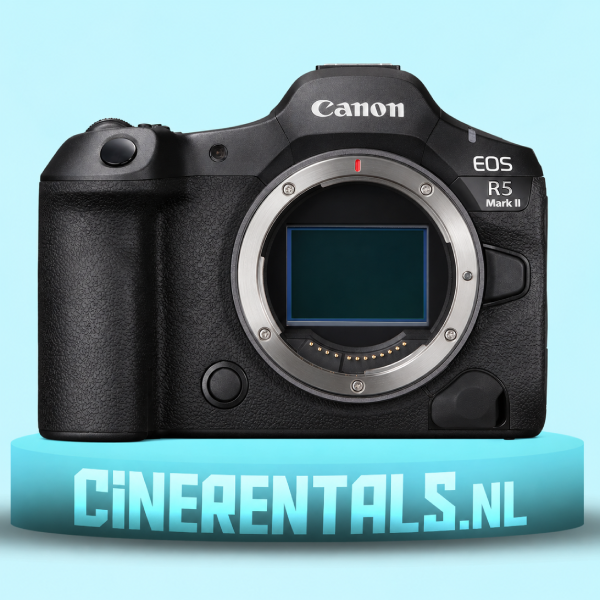
Rent the Canon EOS R5 Mark II in Amsterdam for photo and video. Plan RF lenses, recording formats, memory cards and power before your shoot.
When should you rent a Canon EOS R5 Mark II?
The Canon EOS R5 Mark II suits productions that need high-resolution stills and professional video from one compact body. Its 45MP full-frame stacked sensor, RF mount and internal 8K RAW recording make it worth considering for campaigns, interviews and mixed photo-video assignments. The right rental setup depends on the deliverables, lens choice and recording workflow.
Start by listing what the client needs at handover. A campaign with large stills, short social edits and a website film needs a different schedule from a continuous interview. Share that list with the rental team so the body, media and power plan match the work.
Choose the recording format from the final delivery
For a 4K delivery, first ask whether you need extra room to reframe. Higher-resolution acquisition can help with selected shots, but it also affects media use, copying time and editing. Run a short sample through your complete workflow before committing to the format for a full day.
Canon lists 8K RAW Light recording up to 59.94p and 4K recording up to 119.9p in supported modes. Frame rate, codec and recording conditions matter. Check the exact menu setting you intend to use and review Canon’s mode-specific requirements.
For interviews, prioritise a tested recording duration, dependable sound and a clear backup plan. For slow-motion inserts, plan separate takes and check lighting for flicker. Avoid discovering media or playback limitations after the production has started.
Match RF lenses to your shot list
A standard zoom is a useful starting point for fast changes in framing. A wider lens helps when space is limited or the environment matters. A longer lens gives tighter coverage when you have enough distance. Choose the focal range around actual locations rather than a general idea of a complete kit.
The R5 Mark II uses the Canon RF mount. Canon documents support for EF and EF-S lenses through its EF-EOS R adapters, with different coverage considerations for crop lenses. Confirm the exact lens, adapter and shooting mode together. The E-mount Talon versions listed at CineRentals need their own compatible camera setup.
Plan cards, batteries and file handling
Ask for media approved for the chosen recording format. Card capacity alone does not establish recording suitability. Confirm sustained recording performance, the required card type and a reader that fits the computer you will use.
Build copying into the schedule. Use clearly named folders by camera and shooting day, verify the copied files and keep separate backups before reusing cards. For a hybrid assignment, make sure stills and video files both reach the person responsible for delivery.
Check which batteries, chargers and cables are included with the body booking. Add capacity around the length of the day and access to power. Test the exact power arrangement during the camera check.
A practical handover test
At collection, fit the chosen lens and support, select your recording mode and record a short clip. Check subject tracking, exposure, white balance, sound levels and headphone monitoring where used. Open the clip on your editing system and confirm that the intended colour workflow is available.
For a gimbal setup, balance the complete shooting configuration. For a tripod interview, check that lens changes and access to media remain practical. Record your settings so a second operator can reproduce them.
Frequently asked questions
Is 8K necessary for every shoot? Choose it when the extra detail or reframing flexibility serves the brief and the production can handle the files. A tested 4K workflow may be the more practical choice for many deliverables.
Can the R5 Mark II cover photography and video on one job? Yes, but schedule the changes in setup. A stills lighting plan, video sound setup and framing for different delivery ratios all need time.
What does the rental price include? Check the current product page and request a quote for the complete kit. Lenses, additional media, sound and support should be confirmed against the booking.
Book your Canon rental in Amsterdam
View the Canon EOS R5 Mark II rental page for the current price and listed included items. Compare suitable bodies in the camera rental category and send CineRentals your dates and production requirements.
Technical reference checked on 7 November 2026. Canon EOS R5 Mark II specifications. Recording limits and supported modes depend on the selected configuration.
More rental guides
BLAZAR Talon 35mm vs 50mm vs 75mm Rental Guide • BLAZAR Talon on Canon R5 Mark II? Lens Mount Guide